วันเสาร์ที่ 20 กุมภาพันธ์ พ.ศ. 2553

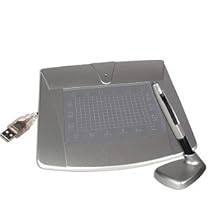
Hanvon Graphic 5x4 Tablet Pen with 2540 resolution and Battery FREE technology


The Hanvon Graphicpal 0504 brings you an exceptional tool to do more jobs than your mouse can reach, such as drawing, painting, writing, and annotating. Working as a pen, it liberates your hand to interact with your computer by the natural feelings that you accustom to in daily life. When not drawing, it also acts as a fully functioned mouse. It works with all major graphic programs easily. By installing it, you will get the pressure sensitivity within those programs, right away. The 512 level pressure graduation with as fine as 0.025mm resolution will satisfy any professional graphic artist, and be easily handled by any non-experienced people, too. By using proper software, you will be able to touch up your digital photos, carving out your pictures, making greeting card, and even make your artworks on computer. Our featured bundled software enable you to digitally sign your documents, annotate webpage, PDF and word documents, and mark up your Powerpoint presentation. You are also able to send your hand written E-mail to your friends through the digital ink technology. You can work them under both PC and Macintosh environment.Our battery-free, cordless Pen technology substantially decreases the pen weight, and lets your pen work flexibly and smoothly with the pad. The transparent pad membrane lets you to slip any drawings underneath it to trace on top. The USB port connection also provides an easy way for installation

Product Details

Amazon Sales Rank: #7849 in Consumer Electronics
Brand: Hanvon
Model: GRAPHICPAL0504
Format: CD
Dimensions: 2.45 pounds
Features
TABLET CORDLESS & BATTERY-FREE PEN

Customer Reviews
Fantabulous!
This works perfectly for me: I completely replaced my mouse with this device. Its a completely different experience - you just don't grow tired like using a mouse. I was a little skeptical because of the price but it performs like a charm - all the taps and drags work perfectly well - drawing is great - the right click function in the pen is also a great addition. However, the one drawback I see in this device is that it does not allow my Mac to go to sleep. Therefore I have to switch off my computer if it is going to be idle for a considerable period of time (this is good for the environment so not quite a serious draw back).

วันศุกร์ที่ 19 กุมภาพันธ์ พ.ศ. 2553

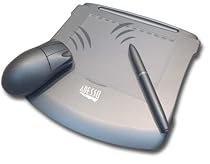
Adesso CyberTablet 6400 6" X 4.5" Graphics Tablet with 2 Button Pen and Wireless Mouse


Ergonomically designed wireless tablet with scroll mouse for easy drawing, handwriting, sketching, coloring and picture editing. With its 6" x 4" workspace, the CyberTablet 6400 offers you the freedom of movement and fine-tuned sensitivity to accomplish the most sophisticated computer-aided designing tasks. A powerful, yet easy-to-use combination of a pressure-sensitive pen, tablet and software lets you naturally draw and write freehand graphics and text as comfortably as you would on real paper.

Enhance Photos

Quickly and easily edit your digital photos using the control of the CyberTablet pen and your free copy of PhotoImpact XL. Take your skills to the next level with this advanced photography software.

Draw and Paint

Create great looking artwork with the natural feel of your CyberTablet pen and the amazing capabilities of the control you need to quickly and easily edit your digital photos. It works great with any software your mouse does and runs on both PCs and Macs. Mark up, Sign, and More

The included CyberTablet pen makes it easy to sketch and write notes in Microsoft Office XP and Apple word processors. Mark up documents in Microsoft Word, annotate presentations in Microsoft PowerPoint, and even jot a note to friends and family.

Professional Graphics Tablet

* USB connection for quick installation.
* Transparent photo frame for easy personalization with photos and artwork.
* Includes 12 function keys for automated tasks.
* High resolution, supports up to 3048 lines per inch.
* Active tablet space: 6" x 4"

Wireless Drawing Pen

* 512 levels of pressure-sensitivity for natural brush control.
* Precise, light and fast-moving cordless pen.
* Dual mouse buttons on pen for efficiency right at your fingertips.
* A natural digital input solution that can prevent you from injuries to your wrist.

Cordless Mouse

* No ball to gum up, so you always have smooth, accurate tracking
* 3 button ergonomic wireless mouse with scroll wheel for right and left handed users.

วันพฤหัสบดีที่ 18 กุมภาพันธ์ พ.ศ. 2553

DigiPro WP8060 8-Inch x6-Inch USB Graphics Tablet with Cordless Pen (Silver)


Paint, draw, write, sign, and sketch all your documents and applications! This Drawing Tablet comes equipped with a pressure sensitive stylus pen and a wireless mouse, giving you the right tools for any task! The tablet features a 8 X 6-inch working area with a pen holder and indicator and a built-in USB cable. The stylus pen has 512 levels of pressure sensitivity and is compatible with most graphic software such as Painter, Adobe Photoshop.

Product Details

* Color: Silver
* Brand: DigiPro
* Model: WP8060
* Dimensions: 8.50" h x 1.00" w x 6.50" l, 3.00 pounds

Features

* Silver tablet and Stylus / All Mouse functions / USB interface / PenMail / Annotate mail
* Soft-tip pen with 512 levels of pressure for drawing programs such as Painter and Photoshop
* Capturing signatures and drawing for inserting into documents
* Pen commands for control and editing functions / Annotating with a pen for Word
* Handwriting communications for NetMeeting and Netscape conference

Customer Reviews

Buyer beware.2
I'll start by saying this tablet is very basic, and if basic is all you need you can't beat the price. Be forewarned, though, the manual included is very ...lackluster & in broken english. Also, good luck with finding a website, manufacturer phone number, or address where you can write to. Don't lose the program disc, or buy one of these that's missing the disc.

I can draw with this tablet in Corel 9, but I don't have any of the pressure sensitivity. I think the instructions try to tell me as much since I'm using XP, but it's hard to tell. No sensitivity with Windows Paint, either. But I know the function does actually work, since I can get sensitivity results in the programs own test-box, but that's it.

Good Enough4
I have been using this tablet for two years now, which I originally bought on ebay. It is beginning to get worn out and may need replacement, so I'm assuming a 2-3 year average life span on this product because I do use it rather often.

This was the first tablet I ever owned; purchased because of the low price, and it has been just fine for me. I use it on a laptop with Windows XP and Photoshop7 and despite a few quirks and occasional minor glitches it functions just fine. I had no trouble with drivers or software.

In using the product I've discovered a few quirks in working with it.
* Pressure sensitivity only works if the device is plugged in before the program you wish to use is started.
* Cannot start the computer with the device plugged in, must plug in after start up is complete.
* Pressure sensitivity can stop if the tablet is left plugged in but unused for too long, although I have not experienced this for a few months now.
* Recently, occasionally the tablet will stop recognizing the pen while working on something, but a quick tap to the keyboard will fix this. May just be a result of being old.

As this is the only tablet I have ever used I cannot compare it to more expensive brands, but I find that it works just fine for me. I use it exclusively for drawing on Photoshop7. Writing functions in Microsoft Word seem to work, but I have only tried once or twice.

Great Value (if you can get it working) 2
I just got this tablet cuz I can't afford a Wacom. I haven't been able to get it to work yet...

**UPDATE - I got it working! See update in comments section. I would also give it 4 stars now that I've figured out my driver issues.**

This product is very low quality (which is why they can sell it so cheaply) and from the reviews and forums on other websites, it seems like about half of the units that are shipped are lemons. Many report that it works flawlessly out of the box. In particular people using MacOSX or Windows Vista seem to have a lot of problems but then again some others who use those operating systems said that it works like a charm. It seems to be either 1)problems with the pen not working or 2)crappy driver software. Put that together with almost non-existant customer service (the company is in China) makes it a huge risk to purchase this. I wish I would have saved for a real Wacom. You get what you pay for...

FYI, Here's a description of my own personal issues:
I'm using a MacBook Pro with OS X 10.4.11. I've tried both the 1.23 and 1.24 drivers for MacOSX but nothing doesn't work. The weird thing is that it actually responds to the pen and all the lights light up when I put the pen on the tablet or push one of the buttons. But the cursor is always stuck in the lower right corner of the screen and no matter what I do I can't get it to leave that corner. If I use my mouse to move the cursor to the middle of the screen, as soon as I hover the pen over the tablet the cursor moves immediately to the lower right corner.

วันพุธที่ 17 กุมภาพันธ์ พ.ศ. 2553

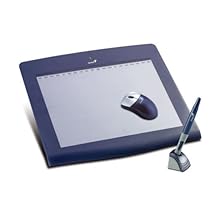
Genius PenSketch 9X12, USB, With PhotoShop. 9x 12 working area for graphic design. Cordless wheel mouse and rubber-coated pen.


This tablet is right for you PenSketch 9x12 is another advanced digital pen tablet for designers, artists and professional users. The 9" x 12" working area is suitable for all types of productivity and more comfortable for long-time users. Using PenSketch 9x12, you can draw and illustrate effortlessly. While processing images, the performance is more precise and more rapid. It also includes programmable "Hot-Cell" area for the office and Internet. Use it with the pen device for super shortcuts.The cordless pen of PenSketch 9x12 features two buttons and 1024 level pressure sensitivity. While drawing with the digital pen, you can control all kinds of shapes and thickness easily. The two buttons of the pen can be programmed as the mouse left and right buttons. The pen- holder helps you store the digital pen and change the pen tip efficiently. In addition, the cordless mouse with scroll wheel gives you more convenience when working on the tablet.

Product Details

* Brand: Genius
* Model: 31100006101
* Platform: Windows
* Format: CD
* Original language: English, French, Spanish
* Dimensions: 21.00" h x 20.00" w x 17.00" l, 30.00 pounds

Features

* Product Type - Graphic Tablet/Digitizer
* Resolution (LPI) -- 2000 (default)
* Number of Buttons -- 2
* Pressure Sensitivity -- 1024
* Mouse Button -- 3

วันอังคารที่ 16 กุมภาพันธ์ พ.ศ. 2553

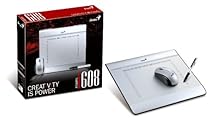
Genius MousePen i608 Graphics Tablet (Silver)


MousePen i608, 6-Inchx 8-Inch graphic tablet for creative painting. increase your productivity and fun with any professional publishing software and MousePen i608, where you can draw and illustrate effortlessly. The 6-Inch x 8-Inch working area with the cordless pen and mouse is great for Windows and MAC users to write, draw, sketch or sign emails. Just click the pen on any of the 29 programmable shortcut keys for instant access to Office and Internet functions. This pen features two buttons and 1024 level pressure sensitivity for thickness during drawing or writing. You can store the pen in the clip on the top and this makes it easy to take along with you. In addition, the cordless mouse with the sccroll wheel gives you more convenience when working on the tablet.

Product Details

* Color: Silver
* Brand: Genius
* Model: 31100057100
* Original language: English
* Dimensions: .98" h x 11.81" w x 10.39" l, 2.00 pounds

Features

* 6-Inch x 8-Inch working area for drawing and handwriting
* 1024-level pressure sensitivity for all shapes and thickness control
* Make handwriting notes/drawings efficiently in email, MSN, documents, or any application program
* 3-button cordless wheel mouse for fast browsing on the Internet and in documents
* Pen clip design for pen easy storage

Customer Reviews

Inexpensive graphics tablet that actually works 4
I bought this to replace an old Intuos 2 pad that finally died. Price was my main consideration, and in that regard, this is a steal. The least expensive Wacom 8x6 pad is $200. You might find it for $180 if you shop, but it's still over twice as much.

The main question is how does this compare to the Wacom Bamboo, the least expensive equivalent? The most important consideration is accuracy, and surprisingly, it's an (almost) even contest. With over 1000 levels of pressure sensitivity, it's more than good enough for photo editing, which is my main use. The pen nibs are not quite as smooth to use but work well enough. Construction quality is not the same. The pad, itself seems more cheaply made, and the mouse is flimsy. The Wacom Bamboo, doesn't even need a mouse anymore, you can use finger gestures, which are a definite improvement. The Genius pen uses a battery, the Wacom doesn't need one. That's not a big deal for me, but worth noting.

For the extra money the Wacom Bamboo comes with full working copies of Corel Painter and Photoshop Elements. The Genius MousePen only has time limited demos. Elements is a version old but still an excellent program. There's also a set of Photoshop filters that are of good quality. If you don't have those programs, especially Elements, the Wacom becomes a bargain. I do, so didn't want to pay extra for duplicates.

The pad works with Macs, but doesn't have all the functionality that it does with Windows. Boo. You can automatically send handwritten notes to Outlook in Windows but not Mail with Macs. On the plus side there are two dozen customizable keys around the edges of the tablet compared to 4 on the Bamboo. That's a definite plus.

If you already own your graphics software, this is a bargain. If you are also looking for painting or photo editing software, consider the Wacom tablets.

Perfect for the money 5

I'll start out by saying that I relatively high expectations for this product when I purchased it, and I have not been let down. This is the only tablet I've owned, and the only one I've used for an extended period of time, and for my needs it works great. The workspace seems to be the perfect size, and has blank space all around it. I thought the blank space would be an issue, but it's really important for comfortability. The high LPI picks up deft movements quite well, the pressure sensor is wonderful, and the pen feels quite comfortable in my hand. The mouse is decent, but I prefer using the mouse I was using before (and still can with no hassle.) The mouse and pen do feel a little flimsy, I'll admit, but not so much that it would cause a problem.

I have 4 issues with this tablet - no eraser end of the pen, the pen and mouse require batteries, the shortcuts on the pad don't open programs correctly (might be my fault) and there is no tilt control on the pen. However, I can grab some rechargeable AAA batteries, select the eraser tool in the program itself, and launch programs the old fashioned way. The lack of tilt is the only key aspect for me.

Overall, I would highly recommend this tablet for newcomers to digital art, even just for touching up photographs in Photoshop. I don't believe I have the expertise to recommend it to a professional, but I don't see anything barring it's use in a professional application. For the money, I believe you get the best bang for your buck here.

I love it !! 4
Pros:
Very affordable price
Plentiful hot keys
Active area is spacious
Pen Storage
Cons:
Bundled Mouse looks very cheap

วันอาทิตย์ที่ 14 กุมภาพันธ์ พ.ศ. 2553

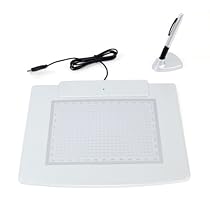
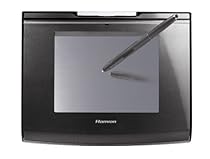
DigiPro USB 4x3-Inch Graphics Tablet with Cordless Stylus Pen


DigiPro USB 4x3-Inch Graphics Tablet Paint, draw, write, sign, and sketch all your documents and applications! This Drawing Tablet comes equipped with a pressure sensitive stylus pen giving you the right tools for any task! The tablet features a 4x3-inch working area with a pen holder and indicator and a built-in USB cable. The stylus pen has 512 levels of pressure sensitivity and is compatible with most graphic software such as Painter and Adobe Photoshop.

Product Details

* Brand: DigiPro

Features

* Graphics Tablet with Cordless Stylus General Features: White tablet and Stylus All Mouse functions
* USB interface
* Soft-tip pen with 512 levels of pressure for drawing programs such as Painter and Photoshop
* Capturing signatures and drawing for inserting into documents
* Pen commands for control and editing functions

Customer Reviews

Nice tablet with very good resolution - horrible drivers 3
I bought this tablet for Christmas this past year for my step-son. I am teaching him digital arts and he loved my Wacom so I figured that I would get him something similar without breaking the bank so I ordered this tablet. The tablet feels solid and the pen has nice grip rubber and feels good using. When you install and start using the resolution seems really good. The problem comes in after you use for a few days, the drivers get really weird with Windows XP Pro SP-3. The mouse will start selecting things that you just hover over and don't work too well. He loved the tablet, but due to "funky" drivers, he has gone back to using a mouse. I went on the company's web site and downloaded updated drivers, but they only worked for a few days and now the pen and tablet are doing the same things again. I really feel that the problem is with the software and not hardware. I may attempt to install a wacom driver and see if it works for that tablet.

Wonderful Tablet 5

I was really worried about buying this product after reading other reviews, but once I actually tried it for myself, it turned out to be a great experience! I had this product for 1 month now,and I think i've done good things with this tablet. First of all, it's not too small. I have small hands so it doesn't bother me. The installation is pretty easy as long as you follow directions completely. In the cd it comes with the trials, photoshop and corel painter. And it also includes one AAA battery which I am still using now.
This tablet works very well with OpenCanvas, Photoshop, and Sai Painter. Corel painter is really not my favorite, but it still works. It works well on my artwork, and it is really more fun than using a mouse. I don't know how a wacom works, but I am very satified with this product!

Tips I might add are: when you have your pen over your tablet, and when you try to use the mouse at the same time, the mouse cursor jiggles. So move your hand away from the tablet when using your mouse.

This is also my first tablet, so I might also add, you are really going to hate this thing until you get used to it! I don't hate it anymore. I really love it now!

วันเสาร์ที่ 13 กุมภาพันธ์ พ.ศ. 2553

VisTablet 12-Inch Tablet


Pen tablets have been around for some time. Not until recently have they become affordable to the general public. They were primarily used by professionals in the graphic art and photo industries.Vistablet 12" (12x10 dimensions), the New Standard in graphic tablets. Pen tablets have been around for some time. Not until recently have they become affordable to the general public. These tablets are ideal for professionals in the Graphic art and Photo industries, students, and general needs for handwriting recognition on your MAC or PC. VisTablet allows you to explore the internet, draw, paint, write, highlight and do professional or home photo editing. Vistablet ahs incorporated all the latest features and benfits needed and expected from a graphics tablet and made it affordable for everyone. The VisTablet has 1,024 levels of sensitivity to the pen-pressure you apply to the surface for superb recognition. System Requirements: Microsoft Windows Vista Microsoft Windows XP (SP 2) Apple OSX (10.3 and later) Please note that the VisTablet graphics tablets are designed to take advantage of built-in features in Windows Vista and MAC OS. Some capabilities will not be available to all users. Mouse capabilities are universal with all compatible operating systems. Always be sure to download the latest drivers available for your operating system.


Product Details


* Color: White/Grey
* Brand: Vistablet
* Model: Vistablet12
* Format: CD
* Dimensions: 10.00" h x 1.00" w x 12.00" l, 2.60 pounds

Features

* Most Affordable Tablet On The Market
* Thinnest and Most Portable Tablet On The Market
* 1024 levels of sensitivity to the pen-pressure
* Mac and Windows Compatible
* No stand-alone power supply required