วันอังคารที่ 2 มีนาคม พ.ศ. 2553

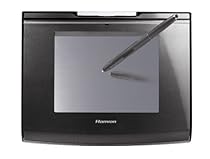
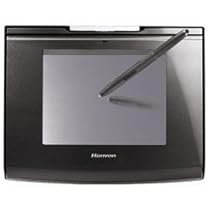
Hanvon 6x5 Graphic Tablet Pen with 2540 resolution and Battery FREE technology


The Hanvon GRAPHICPAL 0605 brings you an exceptional tool to do more jobs than your mouse can reach, such as drawing, painting, writing, and annotating. Working as a pen, it liberates your hand to interact with your computer by the natural feelings that you accustom to in daily life. When not drawing, it also acts as a fully functioned mouse.Our battery-free, cordless Pen technology substantially decreases the pen weight, and lets your pen work flexibly and smoothly with the pad. The transparent pad membrane lets you to slip any drawings underneath it to trace on top. The USB port connection also provides an easy way for installation

Product Details

* Brand: Hanvon
* Model: GRAPHICPAL0605
* Format: CD
* Dimensions: 2.95 pounds

Features


* TABLET CORDLESS & BATTERY-FREE PEN

วันจันทร์ที่ 1 มีนาคม พ.ศ. 2553

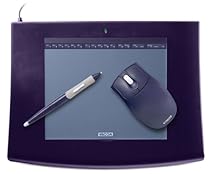
Wacom Bamboo Fun CTE650W WHITE Tablet with Pen, Mouse & Graphics Software (Factory Refurbished)


Now there's a simple, easy, and fun way to harness your creativity. Bamboo Fun makes your computer your canvas, allowing you to freely express yourself by simply touching the pen tip to the tablet. Touch up digital photos, draw by hand, create artwork and paintings, and even write in your own handwriting. Bamboo Fun includes full editions of valuable creative software to help get your creative juices flowing. Edit photos with Adobe Photoshop Elements, create artwork with Corel Painter Essentials, and apply photo effects with Nik Color Efex Pro. Bamboo Fun works with any software, and is the perfect mate to those software applications with special features and tools that are designed to be used with a pen. Tablet Size - 11.0 W x 9.3 D x 0.3 H , active area is 8.5 W x 5.3 D. <<<<>>>>> Package contains - Bamboo Fun pen tablet and pen, Bamboo Fun mouse, pen stand, package of 3 replacement pen nibs, USB cable, quick start guide, installation CD with tablet driver and electronic user manual, software DVD that includes Adobe Photoshop Elements 5.0 Win/4.0 Mac, Corel Painter Essentials 4.0, and Nik Color Efex Pro 2.0 GE.

Product Details

* Color: Silver
* Brand: Wacom
* Model: CTE650W
* Dimensions: 11.10" h x .50" w x 9.20" l, 1.50 pounds

Features

* Great for digital drawing and painting, touching up photos, or writing in your own personal script
* 512 levels of pressure sensitivity to more accurately mimic physical drawing
* Compatible with all major software
* Works with both Windows and Mac operating systems
* 1 Year Wacom Direct Warranty

วันอาทิตย์ที่ 28 กุมภาพันธ์ พ.ศ. 2553

Hanvon 8x6 Graphic Tablet Pen with 2540 resolution and Battery FREE Technology


The Hanvon Graphicpal 0806 brings you an exceptional tool to do more jobs than your mouse can reach, such as drawing, painting, writing, and annotating. Working as a pen, it liberates your hand to interact with your computer by the natural feelings that you accustom to in daily life. When not drawing, it also acts as a fully functioned mouse. Our featured bundled software enable you to digitally sign your documents, annotate webpage, PDF and word documents, and mark up your Powerpoint presentation. You are also able to send your hand written E-mail to your friends through the digital ink technology. You can work them under both PC and Macintosh environment. Our battery-free, cordless Pen technology substantially decreases the pen weight, and lets your pen work flexibly and smoothly with the pad. The transparent pad membrane lets you to slip any drawings underneath it to trace on top. The USB port connection also provides an easy way for installation.

Product Details

* Brand: Hanvon
* Model: GRAPHICPAL0806
* Format: CD
* Dimensions: 3.65 pounds

Features

* TABLET CORDLESS & BATTERY-FREE PEN

Customer Reviews

Very useful for beginning artists 4
After using this product for several months I can say it is an excellent purchase. The tablet is a little thick, giving you the feel of a small sketch pad when you are working, and the surface has the feel of a smooth piece of paper when using the stylus. There is no excessive noise when using the stylus, unlike other less expensive brands that produce a high pitched plastic on plastic skreatch.

The stylus is vanilla. It comes with a plastic base to hold it either upright or horizontilly. The holder also carries extra nibs, which was a nice suprise after wondering what the little hole on the bottom of it was! The battery free function of the stylus is wonderful, although the wieght is a little too light for some peoples taste. Also, there is no grip material, so you will constantly be adjusting your grip while using this item. The stylus also comes with what would appear to be an eraser nib as well. But, this is only cosmetic, and has no actual function other than to slightly copy other more popular style pens....(wacom)....

All in all this is, as I said before, an excellent product for the beginning artist. You get an excellent driver support from the manufacturer that updates drivers about twice a year, a packet of sofware to toy with, and a fairly decent tech support line to contact as well.

Not too shabby 5
I think that it is very good. I never used a Wacom but I seriously can't imagine it being much better. And the price is MUCH better with Hanvon.

วันพฤหัสบดีที่ 25 กุมภาพันธ์ พ.ศ. 2553

Wacom Intuos2 6x8 Graphics Tablet (USB)


The new and enhanced Intuos2 is the modular graphics tablet system for all branches and professions where digital contents are processed. Intuos2 is a completely expandable and flexible system. You can be sure that you'll find the correct combination of tablet and input device - for your own way of being creative, productive and successful with digital media applications.With 1,024 levels of pressure sensitivity, nothing unlocks the power of Photoshop, Painter, Paint Shop Pro and other professional graphics applications like Intuos2. The Intuos2 Grip Pen features Wacom's patented batteryless, cordless technology with 1,024 levels of pressure sensitivity. This cushioned pen reduces your grip effort by up to 40% so that you can work comfortably with less stress. Customers tell that being able to use a pen helps them alleviate mouse and trackball induced repetitive stress injuries.


Pressure Sensitivity and Tilt

Intuos2 features Wacom's unique patented batteryless, cordless technology. With 1,024 levels of pen tip and eraser pressure sensitivity, nothing unlocks the power of Photoshop, Painter, Paint Shop Pro, Flash and other professional graphics applications like Intuos2. All Intuos2 pens also support pen tilt and bearing for completely natural feel and control.

Intuos2 Grip Pen
The Intuos2 Grip Pen features Wacom's patented batteryless, cordless technology with 1,024 levels of pressure sensitivity. This cushioned pen reduces your grip effort by up to 40% so that you can work comfortably with less stress. Customers tell us that being able to use a pen helps them alleviate mouse and trackball induced repetitive stress injuries*.

Comfort and Ease of Use
Intuos2 comes in 5 sizes for every work style from 4"x5" to 12"x18". The tablet connects to your computer's USB (or Serial) port with an 8 foot cable so you have room to kick back and work comfortably. It's easy to use a pen tablet because every point on the tablet has a matching point on the screen. When you move your pen over the tablet, the cursor moves in precisely the same way on the screen. Where you touch your pen tip to the tablet is where you click.

A Better Mouse
Intuos2 batteryless, cordless mice have no ball to clean so you always have smooth tracking. With 2540 dpi resolution they are also much more accurate than other mice. The 4x5 and 6x8 sizes come with the three-button Intuos2 2D Mouse. The 9x12, 12x12, and 12x18 sizes come with the five-button Intuos2 4D Mouse.

Quick Access to Shortcuts
Each Intuos2 tablet features menu strip buttons above the active area of the tablet for easy access to your favorite shortcuts. The menu strip buttons have default shortcuts and they are fully customizable through Intuos2's software control panel. Pen side-switches can also be customized to generate mouse button clicks, keystrokes, modifier keys, or even to generate a pop-up menu selection of shortcuts.

Tracing
Intuos2 pen tablets feature a thick, durable overlay so that you can easily trace photos and art. Because the Intuos2 pen works up to about a quarter inch above the tablet surface, many customers also tape paper and art directly to the tablet surface to change the feel of the working surface and for convenience. Larger tablets offer more working space to simplify this type of functionality with larger art and copy work.

Intuos2 Accessories

The most notable Intuos2 accessory is the Airbrush. This unique input solution provides all of the same capabilities as a real airbrush when used in conjunction with Adobe Photoshop 7 or procreate Painter 7 by Corel, including pressure (height), tilt angle and bearing, and ink flow control. The Airbrush fingerwheel can also be used to control brush size independent of opacity. This is a very handy benefit when working with tools in Photoshop. An Intuos2 brushed metal Designer Grip Pen is also available.

Bundled Software
Nothing makes a pen tablet come alive like great pressure-sensitive software-- and all Wacom pen tablets come bundled with software from companies like Adobe, Corel, and nik multimedia, some of the greatest software companies in the business.

*Wacom makes no representation, promise or guarantee that Wacom products will cure or prevent, in whole or in part, mouse-induced repetitive stress symptoms, injuries or conditions. Individual results may vary. Always obtain competent medical advice to determine the most appropriate treatment for your specific situation.


Product Details


* Brand: Wacom
* Model: XD68USB
* Platforms: Windows NT, Windows 98, Windows 2000, Windows Me, Windows 95
* Dimensions: .56" h x 10.30" w x 13.40" l, 3.50 pounds

Features

* Graphics tablet and highly accurate, cordless, ball-free mouse complete with scroll-wheel
* Grip pen features patented batteryless, cordless technology with 1,024 levels of pressure sensitivity
* May reduce repetitive stress injuries
* Unlocks the power of Photoshop, Painter, Paint Shop Pro and other professional graphics applications
* Works on PC or Mac with USB connection
วันพุธที่ 24 กุมภาพันธ์ พ.ศ. 2553

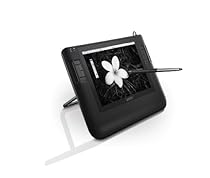
Wacom Cintiq 12WX 12-Inch Pen Display


All over the world, creative professionals use sketchbooks to express their first ideas. This is why the Cintiq 12WX was developed as if it was a sketchbook: With a smooth, flat surface. And with a light weight that enables you to use it on your knees and to show it around to others. As you would do with paper ? digital paper.No matter whether the Cintiq 12WX is on your desk or in your lap ? just plug in and visualize your thoughts immediately with Wacom's patented pen technology on a high-resolution LCD monitor. Which can be part of a multi-monitor environment, too.Tap the full potential of your creativity: slim, light and durable, the Cintiq 12WX enables you to work wherever you feel inspired. It fits into everyday laptop bags. So just choose your favorite working environment ? all you need is a Mac or PC and power. And discover the broad variety of creative opportunities.

Experience all the advantages of direct pen-on-screen input in a low profile, lightweight design! At just 4.4 pounds, Wacom's new Cintiq 12WX combines the advantages of a wide-format LCD monitor with Wacom's patented, professional pen technology to give you the perfect companion for your Mac or PC.

Thin and light, the new Cintiq 12WX gives you the flexibility to work on screen the way you want. Easily rotate the 12.1" TFT display when working flat on your desktop to find the right position for your hand, or stand the Cintiq 12WX upright on your desktop and adjust the integrated stand to a comfortable angle. With a flexible 6.5 foot cord, you can even use it on your lap.

No matter how you choose to use it, the Cintiq 12WX allows you to combine the advantages of natural hand-eye coordination and the intuitive pen-on-paper feel of traditional media with the benefits of digital workflow.

The Cintiq 12WX integrates seamlessly into multi-monitor environments to supplement a primary display or to control other displays. Alternatively, you can use the Cintiq 12WX as a stand-alone display. Its ergonomic design and lightweight profile make it easy to add it to your laptop, desktop, or high performance workstation.

The Cintiq 12WX delivers a highly sensitive pen-on-screen experience so you can work directly on your images and applications in the most natural way possible. With "pen-point" accuracy, fast cursor control, and 1,024 levels of pressure-sensitivity on the pen tip and eraser, the Cintiq 12WX gives you increased control, comfort, and productivity.

Product Details

* Color: Black
* Brand: Wacom
* Model: Cintiq12WX
* Original language: English
* Dimensions: 10.50" h x 16.00" w x 67.00" l, 4.40 pounds
* Display size: 12.1

Features

* Box Contents - Cintiq 12WX Pen Display, Video Control Unit, Grip Pen, Pen Stand, Five replacement Nibs
* 12.1 diagonal WXGA (1280 x 800) Widescreen Display
* 1,024,000 pixels
* 16.7 million colors
* 0.204mm x 0.204mm Pixel pitch

วันอังคารที่ 23 กุมภาพันธ์ พ.ศ. 2553

Manhattan 8"x6"-inch USB Graphics Tablet with Wireless Mouse and Pen for Home and Office


Product Description

Specifications:
** Active area: 15 x 20 cm, 300 sq. cm (6 x 8 in., 48 sq. in.)
** Coordinate resolution: 79 lpmm (2,000 lpi)
** Pen pressure sensitivity: 1,024 levels
** Pen tilt range: ±60° from vertical (detectable)
** Data report rate: at least 100 rps
** Accuracy: pen, ±0.25 mm (0.01 in.); RF mouse, ±0.5 mm (0.02 in.)
** Reading height: up to 15 mm (0.6 in.)
** Compatible with 2000/XP/Vista and Mac OS 9.x or above
** System requirements: Pentium III equivalent or higher; 256 MB hard disk space and 128 MB RAM recommended
** Dimensions: 30 x 27 x 0.65 cm (12 x 10.5 x .25 in.); 621 g (21.9 oz); USB cable, 1.4 m (4.5 ft.)

** Package contents:
(+) Graphics Tablet, 6" x 8" / A5
(+) RF wireless mouse and pen with holder
(+) UC-Logic PenSuite Pro software (full version) ; Adobe PhotoShop CS3 Extended and Corel Painter X (30-day trial versions)
(+) (2) AAA batteries
(+) User manual with driver and software CDs

Product Details

* Brand: Manhattan
* Model: 174459
* Dimensions: 4.96 pounds

Features

* Advanced design tool that helps create and edit digital art also supports handwriting recognition, signature capture and authentication, pen navigation and more
* Generous active area ideal for photographers and graphic designers for use with document annotation, tracing, digital whiteboard presentations and more
* Wireless three-button mouse with scroll and programmable three-button pen provide precise cursor positioning and dynamic option control
* 42 hotkeys including 16 customizable keys provide quick, one-touch access to frequent menu commands and applications
* Compatible with Windows and Mac systems; includes full-version UC-Logic PenSuite Pro software

Customer Reviews

the manhattan VS the wacom 4

I owned the manhattan tablet for a year now. My brother owns a bamboo.
So I had the chance to compare the two.
Physical features:
I did like the "ink well" feature in the bamboo.
But I can live with holding the pen in my right hand and using my left hand on the keyboard to do everything the ink well does.The manhattan pen has its own battery so it can move the cursor while the tip is 2 inches above the pad. It also requires some pressure on the tip to start drawing or create a click function.The bamboo can only sense the pen when the tip is in contact with the pad.
Software annoyance on the manhattan:
I had a problem with assigning the user defined shortcut icons, located around the graphics pad, to open a web browser. Linking the icon to run firefox.exe or chrome.exe was easy and it did open the browser. But it opens it like it was like another user opening the browser. It didn't retain my previous history or bookmarks and it asked if I wanted to set the browser as default. but it was opening properly when clicking on the normal desktop icon. Any suggestions?

Artist.....New to Graphics Tablets 5
Im new to graphics tablets so I cant really compare to other products...However as far as this one goes, I would recomend it to anyone looking for an affordable tablet that works very well.
Set with Vista home Basic with trouble at all...works very well with all programs ive used it with thus far..{MS Paint,one note, word, MGI photo suite and many others}Easy to program buttons...This Is A Very Nice Tablet For The Price...
Highly Recomended.

วันอาทิตย์ที่ 21 กุมภาพันธ์ พ.ศ. 2553

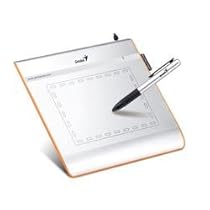
Genius EasyPen i405 Graphics Tablet (Silver)


EasyPen i405, 4-Inch x 5.5-Inch graphic tablet for painting & drawing. Now here's a simple, easy, and fun way to show your creativity. The new EasyPen i405 from Genius allows you to freely express yourself on your computer by simply touching the pen tip to the tablet. The 4-Inch x 5.5-Inch working area with the cordless pen is great for Windows and MAC users to write, draw, sketch or sign emails. Using EasyPen i405 gives you more convenience and is easier to control compared to a mouse. The cursor moves precisely where you position the pen. Just click the pen on any of the 28 programmable shortcut keys for instant access to Office and Internet functions. You just need to barely touch the pen to start a funciton, it features two buttons and 1024 level pressure sensitivity for thickness during drawing or writing. You can store the pen in the clip on the right and this makes it easy to carry and store. Touch up digital photos, draw by hand, create artwork and paintings, and even write in your own handwriting, EasyPen i405 has all these options at your disposal.

Product Details

* Color: Silver
* Brand: Genius
* Model: 31100058100
* Original language: English
* Dimensions: .40" h x 7.83" w x 7.87" l, 1.00 pounds

Features


* 4-Inch x 5.5-Inch working area for drawing and handwriting
* 1024-level pressure sensitivity for all shapes and thickness control
* Make handwriting notes/drawings efficiently in email, MSN, documents, or any application program
* Vista plug and play; handwriting recognition compatible, pen flicks, digital inking in Office and snapping
* functions for convenient operation